


 Warranty Policy
 FAQ
FAQ Download
 Company Events
 Business Events
 Vlog
Vlog Profile
 Why Premteco
 Certificates

 CN
CN EN
EN RU
RU ES
ES AR
AR

High-grade XR LED display-P1.9, P2.6, P2.9

Indoor Small Pitch Mini LED Display-P0.9, P1.25, P1.56

LED Floor Display-P2.5, P2.6, P2.9, P3.9, P4.8,P5.2,P6.25

Extremely Thin 4k LED Display

Fine Pitch LED Display-P2.5, P2, P1.8

Interactive LED Display-P1.2, P1.5, P1.8

Indoor Fine Pitch LED Display-P1.86, P2.0, P2.5, P3.076

Indoor Fine Pitch LED Display

Innovative COB LED Display - P0.78 P0.93 P1.25 P1.56 P1.87

Innovative 4K COB LED Display

Indoor Fine Pitch COB LED Display

Macro High Definition COB LED Display

Indoor Fine Pitch LED Display P0.7, P0.9, P1.25, and P1.56

IP68 Outdoor Front Access LED Display

Outdoor Front Service LED Display-P5, P6, P6.6, P8, P10

IP68 Outdoor Front Service LED Display-P6, P8, P10

Indoor Fully Front Service LED Display - P1.9, P2.6, P2.9, P3.9

Outdoor Front Access LED Display-P4.7, P6.3, P9.5

Outdoor LED Display Screen-P3.9, P4.8, P6.2, P7.8, P10.4

DIP LED Display-P10, P16, P20

SMD Outdoor LED Display-P1.9, P2.6, P3, P4, P6, P8, P10

Die-casting Slim Type Outdoor LED Display-P4, P5, P6.6, P8, P10, P16

IP66 Outdoor Front and Rear Access LED Display

Outdoor Front and Rear Access LED Display P5.71, P6.67, P8 and P10

Cutting-edge Outdoor LED Display Technology Solution

Outdoor Rental LED Display-P2.9, P3.9, P4.8

Outdoor Rental LED Display-P3.9, P4.8, P5.9

High-quality Outdoor Rental LED display-P2.6, P2.9, P3.9, P4.8

Outdoor Rental LED Display-P3.9, P4.8, P5.9

Outdoor Rental LED Display-P2.9, P3.9, P4.8

High Quality Outdoor Rental Transparent LED Display

High Quality Outdoor Rental Transparent LED Display

Indoor LED Display-P2.5, P3, P4, P5

Indoor LED Panel for Rental-P2.6, P2.9, P3.9, P4.8

Indoor LED Panel for Rental-P2.6, P2.9, P3.9

Indoor LED Panel for Rental-P2.6, P2.9, P3.9

Indoor LED Panel for Rental-P2.6, P2.9, P3.9, P4.8

LED Curtain Display-P10.4, P12.5, P15.6, P25, P31.2

Media Facade LED Display-P12, P15, P25, P31, P50

Translucent LED Display-P1.9, P2.8, P3.9, P7.8, P10


Outdoor LED Display Banner-P2, P3, P4, P5

Indoor LED Display Banner-P1.8,P2.5

Indoor LED Display Banner-P1.8,P2.5

Shelf LED Display for Supermarket and Retail Stores


Spherical LED Screen for Indoor and Outdoor Advertising

Oct. 06, 2026< Back to list
Grayscale is a standard specification found in almost every LED display datasheet, but it is often reduced to a single number such as 12-bit or 16-bit. That number alone does not tell you how well a display will reproduce dark scenes, gradients, or subtle color changes.
For an LED display buyer, the more useful question is not simply how many gray levels a product supports, but whether those levels can be reproduced accurately and consistently in real operating conditions. This guide explains how grayscale works, what affects its actual performance, and how to evaluate it when selecting an LED display.
1.What is Grayscale in an LED Display Screen?
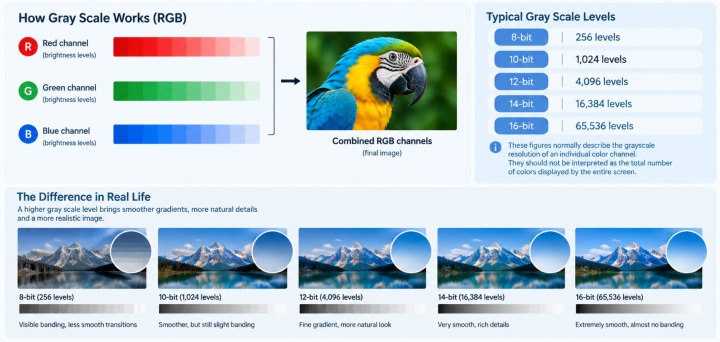
Grayscale refers to the number of brightness levels an LED display can reproduce between its darkest and brightest states. For an RGB LED display, each red, green, and blue channel uses different brightness levels to create the final image.
The greater the number of available levels, the more gradual the transition can be between dark and bright areas.
1.1 Typical LED Display Grayscale Levels:
8-bit: 256 levels
10-bit: 1,024 levels
12-bit: 4,096 levels
14-bit: 16,384 levels
16-bit: 65,536 levels
These figures normally describe the grayscale resolution of an individual color channel. They should not be interpreted as the total number of colors displayed by the entire screen.
2.The Difference Between Grayscale and Brightness
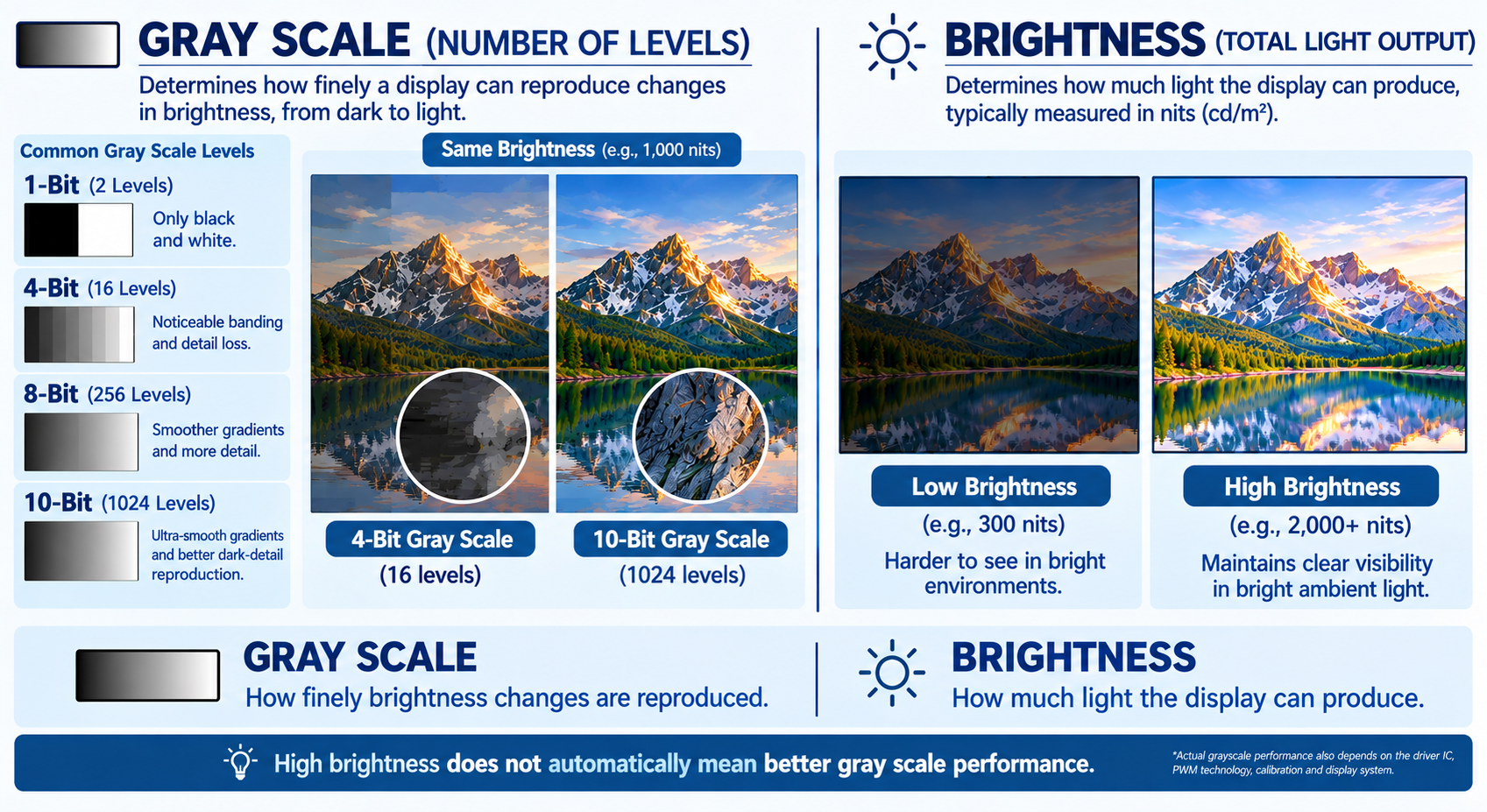
Brightness: Determines the maximum light output of an LED display, typically measured in nits (cd/m²).
Grayscale: Determines the number of distinct brightness levels a display can render from dark to light.The key differences can be summarized as follows:
Grayscale | Brightness | |
What it measures | Number of tonal levels | Light output |
Typical specification | 8-bit, 10-bit, 12-bit, 16-bit | nits / cd/m² |
Main visual effect | Smoothness of gradients and dark details | Visibility in bright environments |
For example, two LED displays may both be rated at 5,000 nits but have different grayscale capabilities. The brightness specification tells you how well each screen can remain visible in bright ambient light, while grayscale affects the smoothness of gradients, shadow details, and low-gray images.
In simple terms, brightness determines how bright the screen can be; grayscale determines how finely it can reproduce changes in brightness.
3. Why Does Grayscale Matter for LED Display Image Quality?
Grayscale affects LED display image quality in several practical ways, from preserving dark-scene details to producing smoother gradients and more consistent colors.
3.1 Better Shadow and Dark-Scene DetailsPoor low-gray performance can make dark areas appear crushed, causing details in shadows to disappear. This is particularly noticeable in stage performances, films, worship environments, broadcast content, and premium indoor installations.
A display with good low-gray reproduction can distinguish subtle differences between black, dark gray, and slightly brighter areas without making the entire image look washed out.
3.2 Smoother Gradients and Color Transitions
Images containing skies, smoke, skin tones, shadows, and lighting effects require gradual tonal transitions. If the available or usable levels are insufficient, transitions may become visibly stepped rather than smooth.
This is one reason grayscale performance matters more for close-viewing and high-quality video applications than for many long-distance outdoor billboards.
3.3 Better Low-Gray Performance
Low-gray performance describes how accurately the display reproduces images when the signal level and brightness are low.
A specification such as 16-bit grayscale says little about this by itself. What matters is whether the display can maintain stable color, detail, and uniformity at low gray levels.
For professional applications, testing low-gray images is often more informative than comparing maximum grayscale numbers.
3.4 Reduced Color Banding
Color banding occurs when a gradual transition appears as visible blocks or steps. Insufficient tonal resolution can contribute to this problem, although processing, calibration, content, and source quality also play a role.
A well-designed display system should preserve smooth transitions throughout the signal chain rather than relying on grayscale bit depth alone.
4.What Determines the Grayscale Performance of an LED Display?
Grayscale performance is not determined by bit depth alone. A 16-bit specification describes the theoretical number of brightness levels, but the actual result depends on how accurately the display generates, processes, and reproduces those levels.
The most important factors are driver IC and PWM performance, LED consistency, signal processing, and calibration. Refresh rate and scan mode also affect the timing available for grayscale control, particularly in camera-sensitive applications.
4.1 Driver IC and PWM
The driver IC and PWM architecture are the core of grayscale control. The driver IC regulates the current supplied to each LED, while PWM controls brightness by adjusting the duration of each light pulse.
Accurate current and PWM control are especially important at low brightness levels, where poor performance can cause loss of shadow detail, low-gray color shifts, uneven dark areas, or flicker.
Therefore, a higher bit-depth specification should always be evaluated together with actual driver and PWM performance rather than treated as a guarantee of better image quality.
4.2 LED Consistency
LED chip characteristics and consistency also affect grayscale performance. The optical response of the red, green, and blue LEDs at low current levels determines how accurately subtle brightness differences can be reproduced.
Variations between pixels or between RGB components may cause low-gray color shifts and uneven dark areas. Package type can influence overall display performance, but it should not be treated as a direct indicator of grayscale quality.
4.3 Signal Chain, Refresh Rate and Scan Mode
Grayscale information must pass correctly through the entire signal chain, from the video source and processor to the sending card, receiving card, and driver IC. If color-depth information is reduced or improperly processed at any stage, the display cannot reproduce the full tonal information of the original content.
Refresh rate and scan mode do not directly determine grayscale bit depth, but they affect the timing resources available for PWM control. Poorly matched parameters can reduce low-gray stability and increase flicker or camera artifacts, particularly in broadcast, rental, stage, and XR applications.
4.4 Calibration and Display Uniformity
Calibration compensates for brightness and color differences between individual pixels and modules, helping the display reproduce grayscale levels consistently across the screen.
Poor calibration or insufficient correction precision can produce uneven gradients and visible low-gray differences even when the hardware has a high theoretical grayscale specification.
Practical Takeaway
In practice, grayscale performance is a system result, not a single specification. Bit depth defines the theoretical range, while driver and PWM performance, LED consistency, signal processing, and calibration determine how much of that capability can actually be reproduced on screen.
5.Common Grayscale Issues and Their Solutions:
Common Grayscale Issue | Possible Causes | Recommended Solutions |
Color Banding | Insufficient tonal resolution, processing limitations, or poor calibration | Improve signal processing, use suitable driver hardware, and calibrate brightness and color consistently. |
Poor Dark-Scene Detail | Weak low-gray performance, driver limitations, or inadequate calibration | Test and optimize low-gray performance and use driver and control components suitable for the application. |
Color Shift at Low Brightness | LED inconsistency, driver current variation, or insufficient calibration | Improve component consistency and perform accurate low-brightness color calibration. |
Uneven Grayscale | Pixel or module variation and inconsistent calibration | Use matched components and perform module-level and display-level calibration. |
Flickering and Unstable Image Performance | PWM frequency, refresh rate, scan architecture, signal processing, or camera interaction | Verify the driving system, refresh rate, PWM behavior, and camera performance under actual operating conditions. |
6. How to Choose the Right Grayscale for Your LED Display?
Choosing the right grayscale for an LED display is not simply a matter of selecting the highest bit depth available. A display advertised as 16-bit grayscale is not automatically better than a well-designed 12-bit or 14-bit display in every application.
The reason is that grayscale is only one part of the image-processing chain. Actual image quality also depends on the LED driver IC, control system, calibration, brightness level, low-gray performance, color consistency, and the type of content being displayed.
For buyers, the more useful question is therefore not “How many grayscale levels does this LED display have?” but:
“Can this display reproduce smooth tonal transitions, natural colors, and dark-scene details under my actual operating conditions?”
The following table can help you determine how much grayscale performance your project really needs.
Grayscale Requirements by Application
Application | Practical Grayscale Reference | Other Parameters to Prioritize | Buying Recommendation |
Outdoor advertising | ≥12-bit for many standard applications | Brightness, contrast, IP protection, thermal performance, power consumption | Do not pay a large premium for grayscale alone |
High-quality outdoor video | ≥14-bit preferred | Low-gray performance, calibration, image processing | Worth considering if the screen displays cinematic or dark video |
Indoor commercial displays | ≥14-bit preferred | Low-gray performance, color consistency, calibration | Evaluate actual image quality rather than advertised bit depth |
Fine-pitch P0.9–P1.5 | ≥14-bit preferred | Low-gray uniformity, color consistency, calibration | Require a real low-gray demonstration |
Rental and stage displays | ≥14-bit preferred | Refresh rate, PWM, flicker, camera compatibility | Evaluate grayscale together with camera performance |
Broadcast / XR / virtual production | ≥14–16-bit depending on system | Refresh rate, PWM, color accuracy, calibration, camera compatibility | Require actual camera testing before approval |
These values should be treated as practical purchasing references rather than universal industry standards. Different manufacturers may define and implement grayscale differently depending on the LED driver IC, receiving card, controller, and image-processing architecture.
7.Common Misunderstandings About LED Display Grayscale
(1) Higher Grayscale Does Not Mean Higher Brightness
Grayscale defines the number of tonal levels, while brightness defines maximum light output.
(2) 16-Bit Grayscale Does Not Always Mean Better Image Quality
Actual image quality also depends on the driver IC, PWM, LED consistency, calibration, processor, and receiving system.
(3) Higher Grayscale Is Not Necessary for Every Application
An outdoor billboard viewed from a long distance may gain less from extremely high grayscale than a fine-pitch indoor, stage, broadcast, or XR display.
(4) Grayscale Is Not the Same as Refresh Rate
Grayscale concerns tonal resolution. Refresh rate concerns image updating. Both affect display performance, but they describe different characteristics.
(5) The Number on the Datasheet Is Not the Whole Story
A high grayscale figure is useful only when the display can reproduce that information consistently under real operating conditions. Sample testing and low-gray evaluation provide a stronger basis for purchasing decisions.
8.Conclusion
Grayscale performance shouldn't be judged by nominal bits alone. True image quality depends on driver ICs, PWM technology, control systems, LED consistency, and low-gray performance. Always verify with real-world testing to choose a specification that fits your application needs without driving up costs.
If you are selecting an LED display for a specific project, Premteco can help you evaluate the right grayscale and display configuration based on your application, viewing distance, brightness requirements, and content type.
Control Room LED Video Walls: How to Choose the Right Display
Flip-Chip vs Wire-Bond COB LED Displays: Key Differences
Flexible LED Displays: Applications and Buying Guide
How to Choose an Outdoor LED Billboard: Pixel Pitch, Brightness, IP Rating and Power Consumption
COB vs MIP for P0.9 LED Video Wall: Which Is Better?
Premteco: special-shaped screen to present a different
How does the LED display follow the 5G trend?
Premteco introduces new design rental screen
Premteco P8 Perimeter LED Screen for Stadium in Canada
Premteco P10 Outdoor Fixed LED Display in Australia
Premteco P1.5 Indoor Full Color LED Screen in Australia
Premteco P8 Outdoor LED Trailer Screen in Australia
Premteco P2.5 Indoor LED Banner Screen in Australia
Premteco P4.8 outdoor LED screen in Qatar
Premteco P1.9 Indoor HD LED screen in Kuwait
Premteco P3.9 Outdoor Rental LED Display in Austria